
We’re rapidly rolling out new capabilities that make validation smarter and more reliable. Glue Intelligence helps Glue deliver better results over time—more accurate, more consistent, and aligned with your practices from one project to the next. Source and Reference documents let you combine product requirements with standards and methods to generate richer test coverage with less ambiguity. Coming soon: inline editing, so you can update test specs directly and make quick, precise changes without switching modes.
April 06, 2026 Release
Glue Intelligence
Better results over time as Glue adapts to your workflow
Glue Intelligence isn’t a single feature. It’s an evolving set of capabilities—Built-In Intelligence, Glue Learning, and (coming soon) Your Guidance—designed to make Glue’s outputs more accurate, more consistent, and more aligned with your practices from one project to the next. This release delivers Glue Learning, including a new UI for reviewing and removing Learning Patterns.
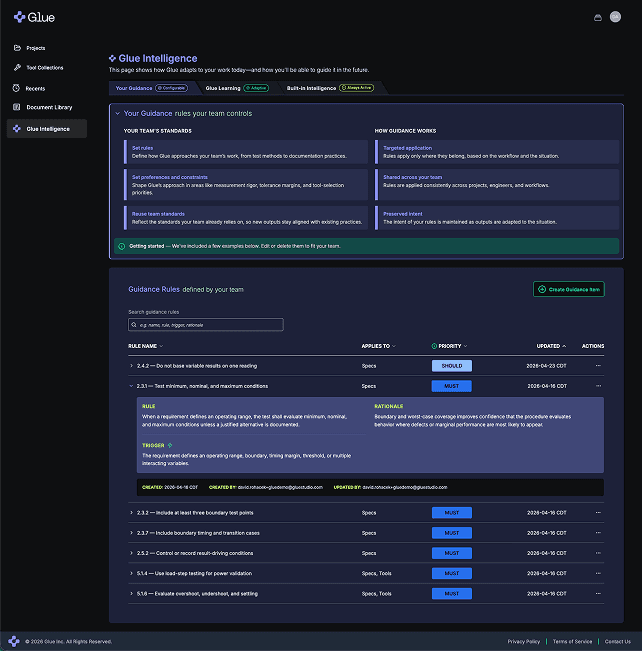
GLUE GUIDANCE — RULES YOUR TEAM CONTROLS
Glue Guidance lets you capture your team’s standards as reusable Guidance items, so you can get more consistent outputs without having to restate the same expectations on every test case.
Encode your team’s standards
Set rules that define how Glue should approach your team’s work, from test methods to documentation practices
Set preferences and constraints in areas like measurement rigor, tolerance margins, and tool-selection priorities
Reuse team standards so new outputs stay aligned with existing practices
Targeted application, not blanket defaults
Scope where Guidance applies (Test Spec, Tools, and Script)
Define triggers and rationales so Guidance applies only where it belongs
Set priority (Must / Should / May) to control how Guidance is applied relative to Glue Learning and revision input
get started quickly
Every tenant includes a small set of example Guidance items — edit or delete them to fit your team
Accessibility: A Major Step Forward
We’ve rolled out a major set of accessibility improvements across Glue, bringing the platform
to roughly 95% alignment with accessibility best practices.
These updates improve how users navigate and interact with Glue, including enhancements to keyboard usability, visual contrast, and assistive technology support.
Why this matters
Great tools should work for everyone. These improvements make Glue easier to use in a wider range of environments, while also improving overall usability, consistency, and clarity across the product.
What this means moving forward
We’re continuing to prioritize accessibility as a core part of the Glue experience. Our goal is to reach full alignment with accessibility standards while maintaining the speed and flexibility our users expect.
February 13, 2026 Release
Glue Learning — inspect and manage
Learning Patterns
Glue Learning has been redesigned to capture richer Learning Patterns over time — and, just as importantly, show you what it learned so you can keep it aligned with your practices.
See what Glue learned from you
Browse and search Learning Patterns captured from your revisions and accepted outputs
Each pattern includes what it applies to (Test Spec, Tools, or Script) and when it’s likely to be reused
Expand a pattern to see the trigger, the rule, and the rationale behind it
Stay in control
Delete any Learning Pattern you don’t want influencing future results
Keep Glue adaptable — learnings reflect your workflow, they don't enforce rigid rules




Test case input & revision improvements (Inline & Global) —
a smoother way to iterate without losing your place

We made it easier to give Glue input exactly where you’re working — and clearer what happens next.
Inline input is easier to use
Add focused input directly from the relevant part of a Test Spec, so changes stay tied to context
Keep momentum while iterating — less hunting for the right place to provide input
Global input is always within reach
Provide broader input for the whole Test Spec without switching context
Clearer entry point for “one request that affects everything”
Clearer “what’s next” indicators
Status signals make it obvious when input is ready to Revise and when changes are ready to Save
December 03 2025 Release
Multi-Doc & Enhanced Workflows
Bring every document your product relies on into one connected workflow.
Design specs, subsystem documents, internal methods, and standards — individually referenced by any project with clearer structure, better processing, and smoother navigation.
Build richer test plans with documents for every purpose
Hardware teams use many different documents, each serving a specific role:
Product definition — top-level design specs, subsystem specs, interface descriptions
Test method definition — standards, internal procedures, best practices
Historical and organizational knowledge — reference guides, checklists
Until now, you could only associate one document with each Glue project and Glue treated all documents as design input. This release removes that limitation completely.
Multi-Doc brings every relevant input into view, giving you a stronger foundation for consistent, traceable test planning.
Reach out to get started: hello@gluestudio.com
New Release: Multi-Doc support

Multi-Doc: The core of this release
Build test plans from the full ecosystem of documents that define your device and your testing approach.
Add multiple documents to a project — design specs, subsystem docs, methods, and more — each processed independently and then unified into a single, coherent test plan.
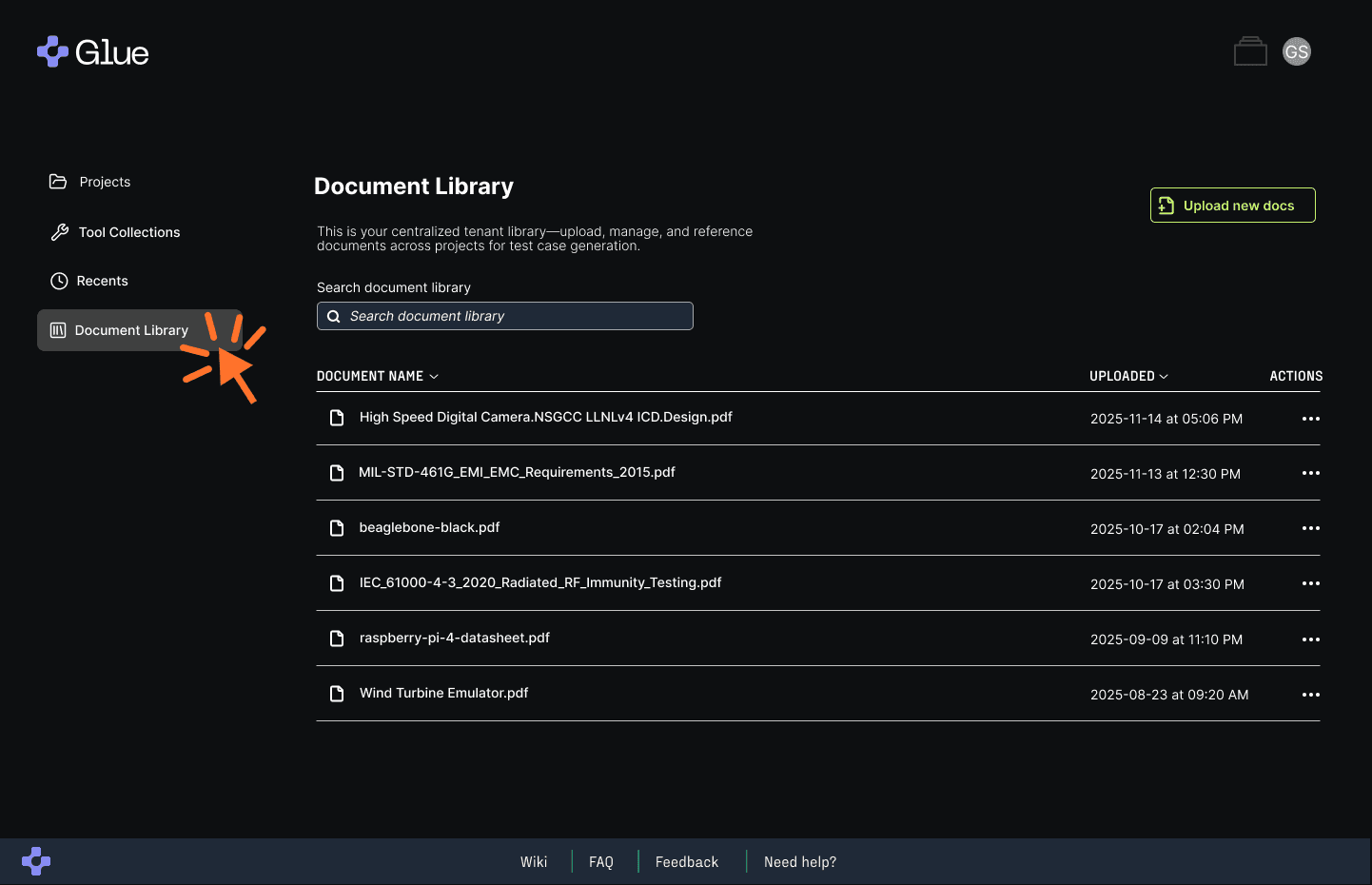
Document Library
Upload documents once and reuse them across any project. The Document Library serves as your organization’s shared, persistent source for specifications and reference material.
New Release: Document Library
New Release: Source vs Reference Documents
source vs reference Documents
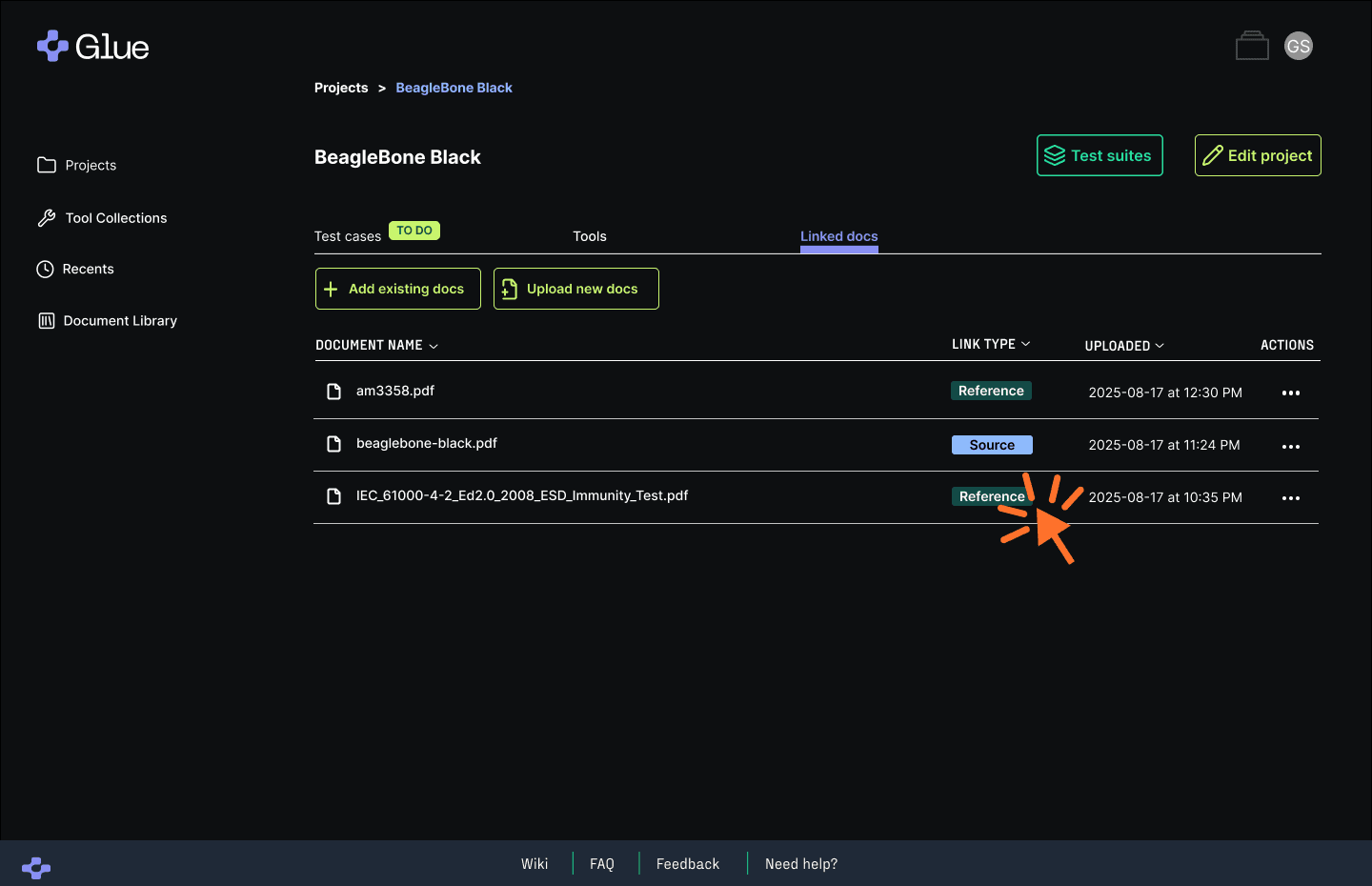
Designate whether each document defines what to test or how to test. Glue generates test cases only from Source documents and enriches them with details from Reference documents.
More accurate extraction and organization of complex documents
The Glue Engine has been enhanced to do an even better job interpreting complex real-world files, delivering cleaner, more structured inputs to test generation.
Key improvements include:
More accurate identification of features, limits, and requirements
Better handling of tables, parameter blocks, and mixed-content sections
Clearer traceability from test specs to source documents
These enhancements make Glue more reliable when working with detailed or irregular design and reference documents.
Link and manage documents with greater clarity
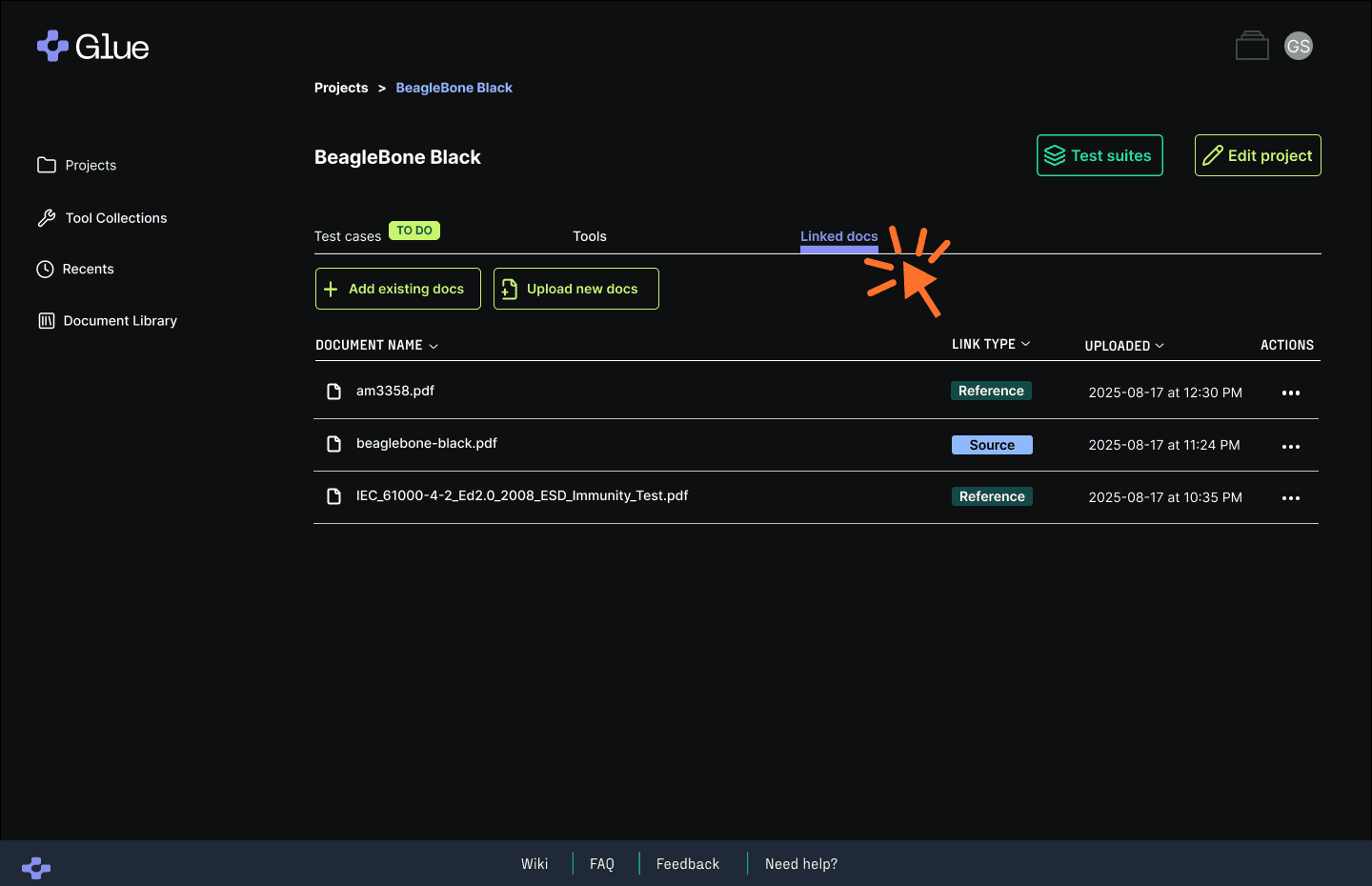
Creating a new project now starts in the Linked Docs tab — the central hub for uploading documents, linking existing files from your Document Library, and linking both Source and Reference documents.
This release introduces several improvements that make Glue easier to navigate and faster to use throughout your test planning workflow.
New Release: Linked Docs
New Release: Processing status
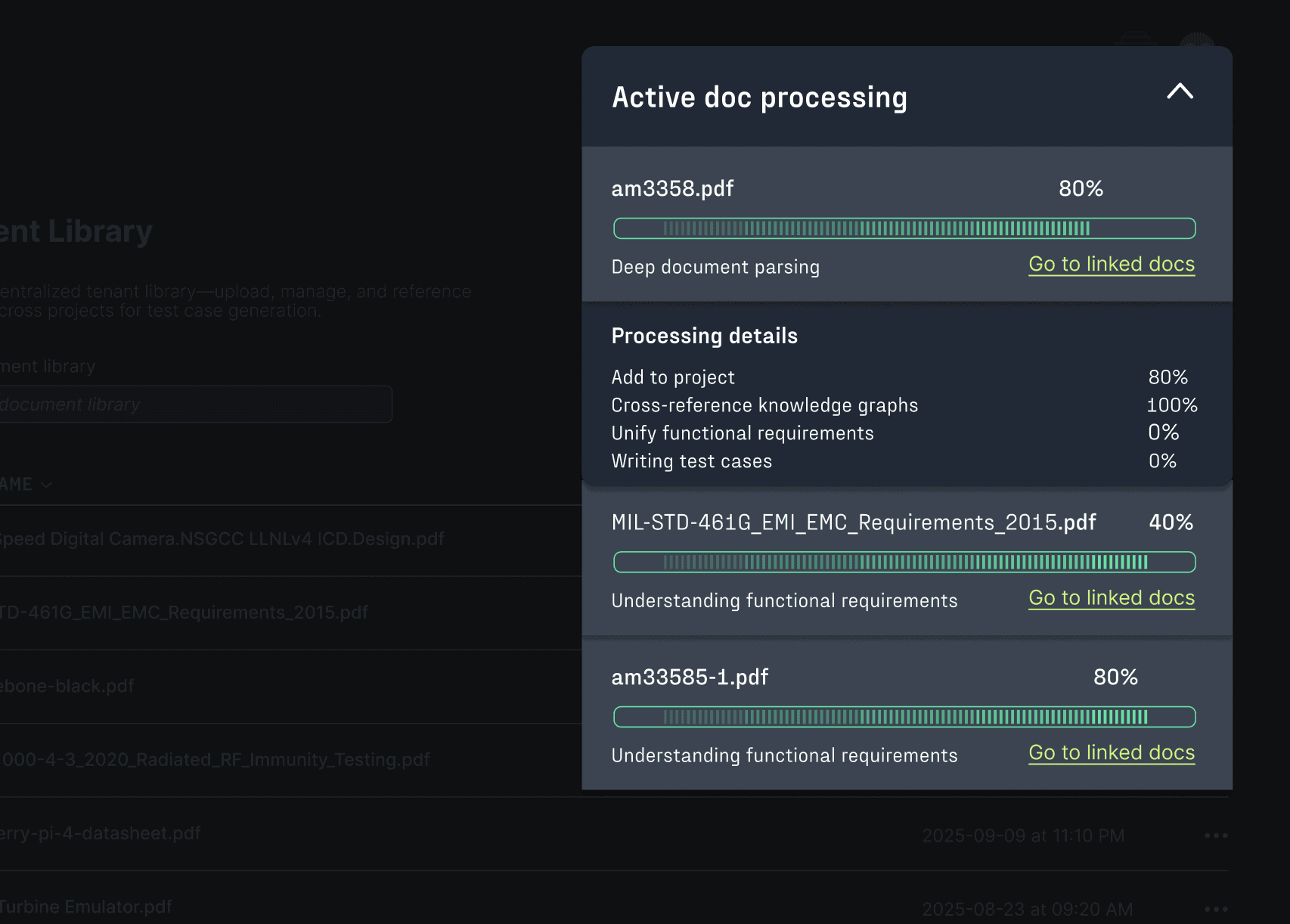
Stay oriented with real-time processing updates
A dedicated Processing Status panel shows the progress of uploads and link/unlink operations, so you always know when Glue is ready for your next step.
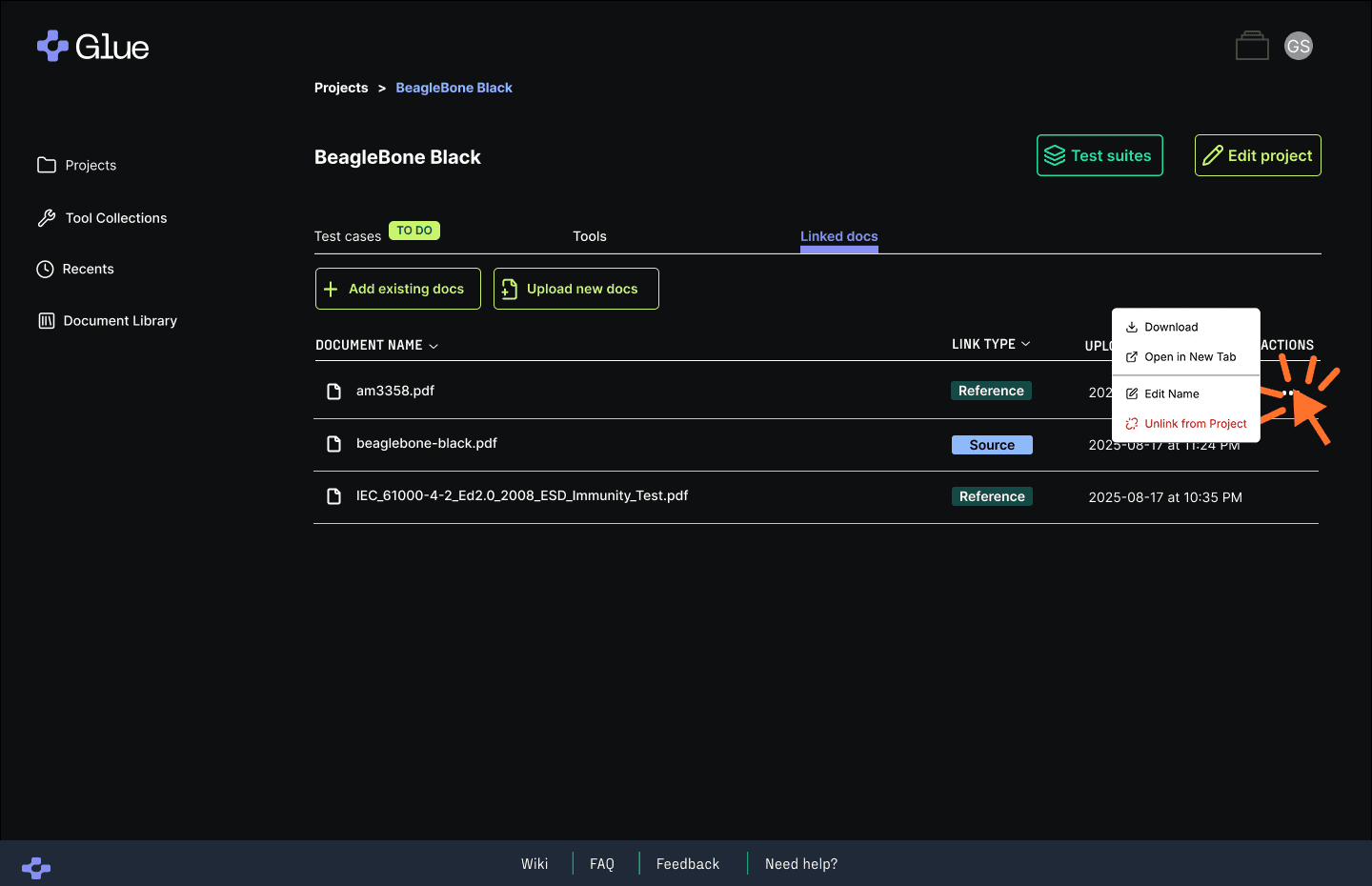
Download or open project documents directly
Quick access to the documents behind your test plan — without hunting through local folders or wondering whether you’re working from the right version.
New Release: Document Download
More polish across the app
Hardware teams use many different documents, each serving a specific role:
You’ll also see:
Inline next-step indicators — no more pesky “Select Tools for this Test Case version?” popups
Performance improvements across project views
More consistent color and interaction patterns
Together, these updates make Glue feel faster, smoother, and more predictable.
What this release unlocks
The new Multi-Doc release is more than an upgrade — it’s a foundational shift in how teams plan, review, and execute testing. It’s built for the complexity you're already managing.
True cross-document intelligence - See how your specs relate to one another, track what’s changed, and understand the downstream impact — automatically.
Smarter navigation through complex test plans - Quickly find, organize, and reason about test cases across multiple specs, revisions, and strategies — without losing context.
Support for multiple test strategies in a single plan - Manage edge cases, alternate paths, and layered validation in one place. No more duct-taping together partial test plans.
Version-aware reviews - Spot differences between doc versions or test runs with precision, so you’re always validating the right thing.
This isn’t just a feature — it’s the infrastructure your team needs to scale testing, collaborate confidently, and move fast without breaking things.
Try the new capabilities today
If you’re a licensed Glue user, Multi-Doc and the enhanced workflows are live in your workspace.
If you’d like a walkthrough of any of the new capabilities or want help applying them to an active project, we’re here to support you! Reach out to your direct contact or email hello@gluestudio.com to set up time.